jpg → real layers
They're right that a converter can't do this. We don't convert — we rebuild.
* Free to use — the editor runs in your browser, and nothing is uploaded unless you start a server step: the AI tools, or upscaling a photograph (logos and flat artwork are enlarged on your device). A free account (Google, Apple or an emailed code — no card) is needed to download the finished file, and comes with credits for the server-side tools.
Ask the internet how to turn a JPG into an editable PSD with layers and the answer is unanimous: you can't, the layer information is gone, a converter just drops your flat image onto a single background layer. That is completely true — for converters. What actually works is reconstruction: AI looks at the picture, separates the subject, objects, text and background, fills the hole behind each one, and writes a genuine layered Photoshop file. Not the original layers (those are gone forever) — new, editable ones.
Rebuild a JPG into layersWhy "jpg to psd converter" gives you a flat file
A JPG stores one grid of pixels and nothing else — no layers, no text objects, no fonts. So a format converter has nothing to separate; it wraps your flat pixels in a .psd container as a single locked background layer and calls it done. That is why the forums are full of "how do I restore to layers?" answered with "you can't." The extension changed; the file didn't. It is an honest limitation of treating this as a file-format problem.
Reconstruction is a different job
We don't convert the file — we re-read the picture. AI segments the image into its real parts (subject, each object, text, background), and because lifting an object leaves a hole, it inpaints the background behind every part so each layer is complete and independently movable. The result is a true multi-layer PSD with named layers and groups that opens in Photoshop, Affinity, Photopea and GIMP. Honest scope: this reconstructs sensible, editable layers from the visible image — it cannot resurrect the exact layers the original designer had, because that information was destroyed the moment the file was flattened.
And the text comes back editable
This is the part converters can never touch: the text in your JPG is just colored pixels, but we detect it, read it, and write it back as a real Photoshop type layer you can re-type, translate or restyle. We verify it on every export — a written file re-opened in an independent PSD reader still reports the text as live, editable type with its size and color intact. Delicate or heavily stylized logos are flagged rather than faked, so you're never handed a wrong guess.
Unflattening is not a format conversion
People search for this as "unflatten an image", and the phrasing is worth taking seriously because it names the confusion exactly. Flattening is not a wrapper you can peel off — it is destructive, in the way baking is destructive. When a design is exported to JPG or PNG, every layer collapses into a single raster and the subject, the background, each object and every line of text become the same undifferentiated pixels. Nothing about the resulting file remembers that they were ever separate. That is why renaming it to .psd changes nothing, and why no amount of format cleverness gets the structure back: the information is not hiding in the file in a form a converter could read, it is gone. Unflattening, done honestly, means looking at the picture and rebuilding a layer structure that behaves like the one that was lost. Any flat raster is a valid starting point — JPG, PNG, WebP, a screenshot, a Canva export, a photo of a printed proof.
The 30-second honesty test
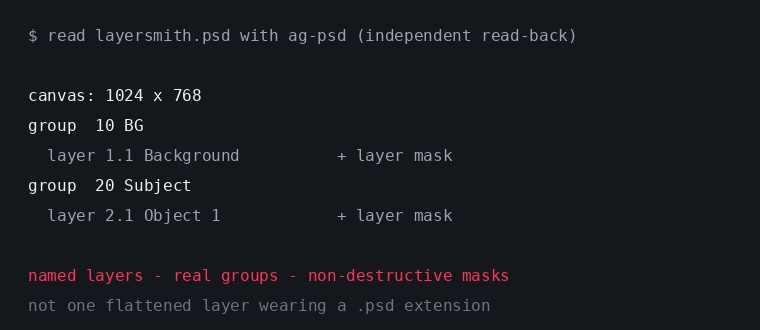
Any tool can slap a .psd extension on your image. Before you trust one, open its output and check the Layers panel: one "Background" layer means you got a renamed JPG. Real separated layers you can hide, move and edit means reconstruction actually happened. Two bonus checks that catch the halfway cases: does each lifted layer carry a mask (editable) or baked-in transparency (destructive), and when you drag a layer aside, is there filled background underneath or a hole? Below is one of our own exports read back with an independent PSD library rather than with our own writer — which is the only version of this evidence worth anything.
What is actually in the file
The PSD arrives with numbered groups — 10 BG, 20 Objects, 30 FX — a named layer per element you separated, and every lifted selection attached as a real non-destructive layer mask rather than baked into the alpha, so you can refine a cut with a brush in Photoshop instead of living with it. Regions the AI reconstructed are prefixed AI_Fill_ in the layer name, so provenance is never a guess. It opens in Photoshop, Affinity Photo, Photopea, GIMP and Krita, and if your pipeline ends in an open-source tool you can export OpenRaster instead and skip PSD entirely.
What it costs to rebuild one
The editor, the click-to-select AI, edge cleanup and the ORA and PNG-stack exports are free and unlimited, because they run on your own hardware — the JPG never leaves your machine for any of that. PSD export is free three times a day. The server steps are the metered ones and each is labelled with its price before you click: the strongest subject model is 1 credit, auto-detect starts at 1 credit and adds 1 for each object whose outline needs rebuilding by the strongest model (capped at 8 per run), and filling the background behind a lifted object starts at 2 credits — large or structured holes route through an HD pass that costs more, currently 6 credits. Credits come with a monthly plan, or as a one-off pack whose credits never expire — see the pricing page for current prices in your currency. Nothing is ever watermarked or downscaled on any tier; the free tier caps quantity, never quality.
Frequently asked
Can you really recover my original PSD layers from a JPG?
No — and no honest tool can; flattening permanently discards them. What you get is a freshly reconstructed layered PSD (subject, objects, text, background) built from the visible image, which is what people actually need.
Is the text genuinely editable in Photoshop?
Yes. We write real type layers, verified to round-trip as live editable text — not a rasterized picture of the words. The font maps to a close standard face; you fine-tune from there.
What about quality loss from JPG compression?
Compression artifacts in the original stay in the original pixels — reconstruction can't undo them, and we don't claim to. It rebuilds the layer structure, not the lost bytes.
What can I unflatten besides a JPG?
Any flat raster: JPG, PNG or WebP, including screenshots and exports out of Canva or Figma. A transparent PNG keeps its alpha and the subject comes back cleanly cut against it.
Does my image get uploaded?
Not for the free tools — selection, editing and both file writers run in your browser, so the image never leaves your device. Only the optional server AI buttons send pixels, each one labelled with its credit cost, and those server copies are deleted within 24 hours. Nothing you send is ever used to train models.
Is the resolution preserved?
Yes. Original and separated pixels stay at native resolution and the PSD is written at your source dimensions — a 4K image in gives a 4K layered PSD out. The only model-limited region is the fill behind a removed object, and those are labelled AI_Fill_.
Keep reading
Make flattened text editable againWhy most "image to PSD" converters are fakePNG to PSD with real layersKeeping full resolution through the rebuildRelated
The text got flattened into the image. Get it back as editable type.Canva won't export a layered PSD. Rebuild one from your image.Material separation for Live2D, with AI doing the boring halfYour product photos, as layered files you ownSplit a background into parallax planes for your 2D gameHow PSD layer writing actually worksRemove the object, fill the background, and keep the objectCanva can layer an image now — but only inside Canva