buyer beware
Most "image to PSD" converters are fake. Here is the 30-second test.
* Free to use — the editor runs in your browser, and nothing is uploaded unless you start a server step: the AI tools, or upscaling a photograph (logos and flat artwork are enlarged on your device). A free account (Google, Apple or an emailed code — no card) is needed to download the finished file, and comes with credits for the server-side tools.
A .psd extension does not mean layers. Many converter sites return your image as a single flattened layer in Photoshop's wrapper — technically a PSD, functionally a JPEG. Here is how to tell in half a minute, without taking anyone's word for it.
See a real conversionThe trick, explained
Writing a one-layer PSD is trivial — any image library does it. So a site can accept your JPEG, wrap the same pixels in a .psd container, and be technically honest while completely missing the point: you wanted the objects on separate layers. Other tools run real AI but stop halfway, returning a "layer sheet" (one big PNG with your objects arranged in a grid) or a ZIP you must reassemble in Photoshop yourself. Both let the site claim layers without writing a layered file.
The 30-second test
Open the downloaded file in Photopea (free, in any browser) and look at the Layers panel. One layer named Background: fake. A handful of named layers you can toggle, move, and mask: real. Bonus points: check whether each layer carries a mask (editable) or baked-in transparency (destructive), and whether moving a layer reveals a filled background or a hole.
What honest output looks like
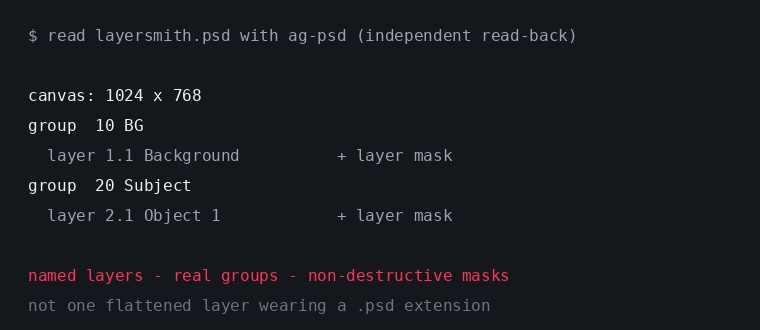
This is a Layersmith export read back with an independent PSD library, not our marketing, our file format. Named layers, real groups, and a non-destructive mask on every lift. Every claim on this site links to unretouched output like this, because in a niche full of wrappers, provable layers are the entire product.
Why no tool can "recover" the original layers
One more honesty checkpoint: a flattened image does not secretly contain its source layers. Flattening is like baking: the ingredients are gone as ingredients. Anything promising to restore the original PSD from a JPEG is lying. What good tools actually do is build a NEW, clean layer structure: segment the objects, reconstruct the background behind them, and write a file that behaves like a designer made it. That is a different and more useful promise, and it is the one we make.
Questions to ask any converter
Does the download open with multiple named layers in Photopea? Is the background complete behind lifted objects, or full of holes? Are masks editable or baked in? Does the free tier watermark or downscale your file? And where do your pixels go, and for how long? That last one is usually answerable without asking anyone, because retention is normally written down: imagetolayers.com's privacy policy, for instance, states it keeps files "only as long as needed to provide downloads (e.g., 7 days on Free, longer on paid plans)" (checked 29 July 2026). That is a legitimate design — longer retention is how you offer re-downloads — but it is a different trade from ours, which is nothing uploaded at all on the free tier and 24-hour deletion of anything that is. Read the policy rather than the landing page, on any tool including this one.
Frequently asked
Is a one-layer PSD ever legitimate?
Sure — if you only needed format conversion for a pipeline that demands .psd input. But if the site advertised "layers," one flattened layer is not what you paid attention (or money) for.
What is a "layer sheet"?
A single PNG with your separated objects arranged side-by-side on a grid. The separation may be real AI work, but you still have to cut it apart and rebuild a layered file by hand: the part you wanted automated.
How do I check a PSD without Photoshop?
Photopea.com — free, runs in the browser, opens PSDs with full layer, group, and mask support. If a converter's output looks wrong in Photopea, it is wrong.
Is Layersmith's free tier actually layered too?
Yes — free exports are identical in structure to paid ones. The free tier caps PSD quantity (3/day), never quality, and ORA/PNG-stack exports are unlimited.
Keep reading
How PSD layer writing actually worksJPG to editable PSD with layersWhy AI layer tools lose resolutionRelated
Free online color separation for screen printingSpot color separation, free and in your browserIndex color separation, and when to choose it over simulated processSimulated process color separation, with the override you will needCMYK separation for screen printingHalftones for screen printing: lpi, angles, dot shape, film outputHow to create a white underbase for dark garmentsRaster to vector for screen printing: turning a customer JPEG into plates