image → psd
Turn a flat image into a PSD with real layers
* Free to use — the editor runs in your browser, and nothing is uploaded unless you start a server step: the AI tools, or upscaling a photograph (logos and flat artwork are enlarged on your device). A free account (Google, Apple or an emailed code — no card) is needed to download the finished file, and comes with credits for the server-side tools.
Click the objects you want, lift them to layers, and download a .psd with named layers, groups, and non-destructive masks, not a flattened file wearing a new extension.
Convert an image nowThe dirty secret of "image to PSD" converters
Most of what ranks for this search does one of two things: renames your JPEG into a single-layer PSD, or runs AI segmentation on a server and hands you a ZIP of PNGs you must reassemble in Photoshop yourself. The first is useless; the second is homework. What you actually wanted is a file that opens with the objects already on their own layers — movable, maskable, named.
What a Layersmith PSD contains
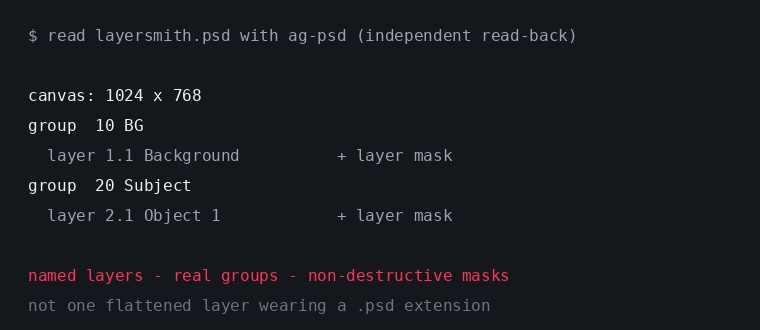
The file is written directly by a PSD engine in your browser: numbered groups (10 BG, 20 Objects, 30 FX), a named layer per object you separated, and: this is the part nobody else does: every lifted selection carried as a real, non-destructive layer mask. Open it in Photoshop and you can refine the cut with a brush on the mask instead of living with baked-in transparency. Inpainted regions arrive prefixed AI_Fill_ so you always know which pixels were generated.
How the conversion works
Open your image (JPG, PNG, WebP — it stays on your device), then separate it your way: click any object with AI grab and lift it; press Separate subject for a one-button portrait or product split; Auto-detect to turn every object in a scene into its own named layer; or Split by color for logos, posters, and flat art. Mix approaches freely: every method feeds the same layer stack, and the wand, lasso, and brush fix anything the AI missed.
Opens everywhere PSDs open
Photoshop, Photopea, Affinity Photo, GIMP, and Krita all read the output. We verify the format against independent readers, not just our own writer. If you live in open-source tools, export OpenRaster (.ora) instead and skip the PSD entirely; it is the same layer stack in the format GIMP and Krita treat as native.
Free where it counts
The editor, the AI click-to-select, edge cleanup, and ORA/PNG exports are free and unlimited, because they run on your hardware. PSD export is free 3 times a day; a monthly plan makes it unlimited and adds the server-grade models. No watermarks on anything: a capped quantity of full-quality output, never a degraded one.
Frequently asked
Is the PSD really layered?
Yes: that is the entire point of the product. Named raster layers inside real groups, with each lifted selection attached as a non-destructive layer mask. The proof image above is an exported file read back with an independent PSD library.
Does my image get uploaded?
Not for the free tools. Selection, editing, and the PSD/ORA writers run in your browser. Only the optional server AI buttons (marked with a credit cost) send data anywhere, and server copies are deleted within 24 hours.
Can it recover the original layers of a flattened design?
No tool can — flattening throws that information away, like unbaking a cake. What Layersmith does is build a new, clean layer structure from the finished image: real object layers with filled backgrounds behind them, which for editing purposes is usually better than the original anyway.
What is the maximum image size?
Exports are always at your image's full native resolution. Very large images are processed at reduced resolution for the interactive AI, but the final file is never downscaled.
JPG to PSD and PNG to PSD too?
Yes — JPG, PNG, and WebP all work. PNG transparency is preserved into the layer stack.
Keep reading
Split any image into editable layersScreenshot to an editable, layered PSDHow PSD layer writing actually worksPrint-ready PSD from flat artworkRelated
Split any image into separate, editable layersSplit an image into layers — by object, or by colorTurn any image into a layered .ora for GIMP and KritaA layered PSD that keeps your full resolutionRebuild flat artwork into a print-ready layered PSDAn Image to Layers alternative, compared honestlyUpscale artwork for printing without it going softA free image upscaler that does not ask for anything first