low-res art → print size
Upscale artwork for printing without it going soft
* Free to use — the editor runs in your browser, and nothing is uploaded unless you start a server step: the AI tools, or upscaling a photograph (logos and flat artwork are enlarged on your device). A free account (Google, Apple or an emailed code — no card) is needed to download the finished file, and comes with credits for the server-side tools.
The file a customer sends is almost never the file you needed. A 600-pixel logo pulled off a website has to end up eleven inches across on a shirt, and enlarging it in Photoshop just makes the same picture bigger and blurrier. An upscaler is not a resize — it rebuilds the edges rather than stretching the pixels between them.
Upscale artwork freeWhy Image Size in Photoshop cannot fix this
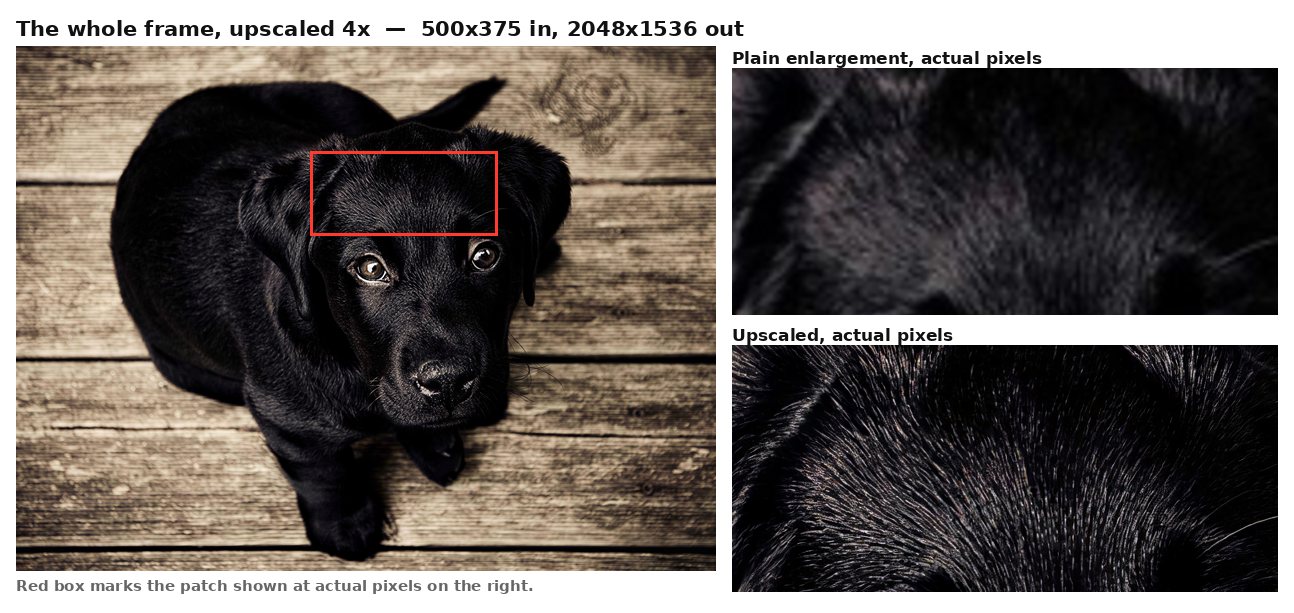
Resampling interpolates: it decides what colour belongs between two pixels by averaging its neighbours. That is arithmetic, and arithmetic invents no information — you get a larger file containing exactly as much detail as the small one had, spread thinner. A trained model is doing something different. It has seen enough real photographs to reconstruct what the missing detail probably looked like — measured here on a 500px landscape blown up four times, individual conifers, scree and shoreline come back where bicubic gives green mush.
What 300 dpi actually asks of you
The working rule is 300 dpi at final print size, which is a statement about pixels, not about a number stored in the file. An eleven-inch print wants roughly 3,300 pixels across. Changing a JPG from 72 to 300 dpi in an export dialog changes metadata and nothing else — the pixels are identical and the print is identically soft. The only two honest fixes are a bigger original or a genuine reconstruction.
Where it runs, stated plainly
This one is a server tool, and it is worth being exact about that because the rest of the editor is not. Background removal, colour separation, the brush and lasso tools and every export run inside your browser and never transmit anything. The upscaler cannot: the model runs on Cloudflare’s network, so the picture is uploaded, upscaled, and the source deleted as soon as the result comes back. Nothing is used to train anything.
The limits, before you spend time on it
Signed out you get two a day at up to 4 megapixels out. A free account — no card — gives three a day at up to 8 megapixels, which is 3264×2448, enough for an eleven-inch print at 300 dpi. Past that it costs one credit, and signing up grants a batch of them. Nothing is watermarked at any tier, and nothing is quality-reduced: the free tier caps how many, never how good.
Where it helps, and where it honestly will not
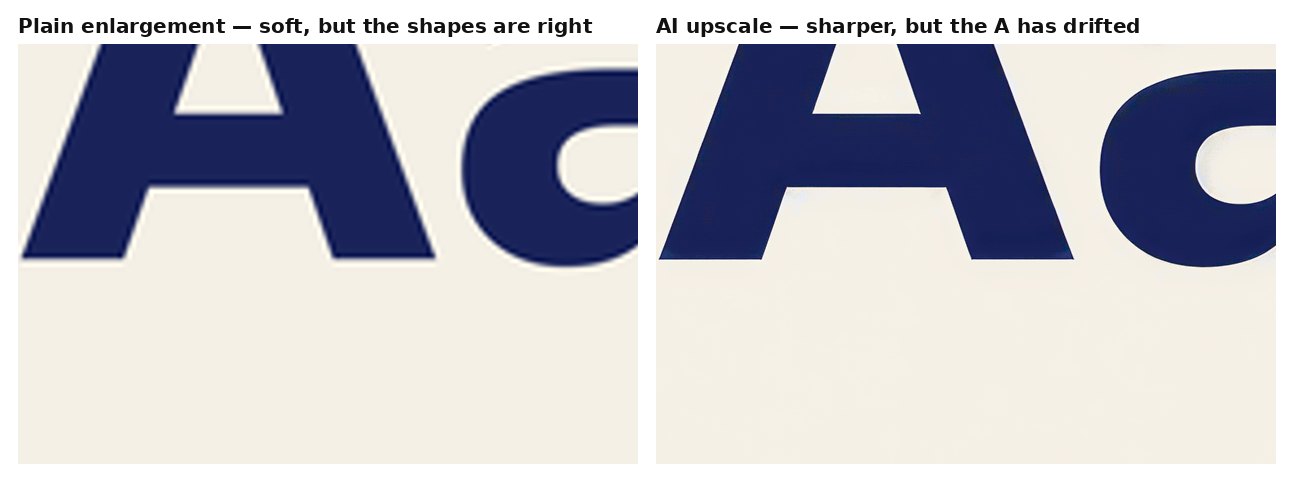
Photographs are where this genuinely shines. Landscape, product and lifestyle shots gain real texture — foliage, fabric, stone — because the model has seen enough of them to reconstruct plausibly. Type and precise letterforms are the honest hard case, and not in the way you would expect: the edges come back sharper than bicubic, but the shapes themselves drift. We upscaled anti-aliased type four times and the capital A came back with a skewed apex and an uneven crossbar — crisper, and the wrong shape. For a customer logo that has to be exact, that is a defect, not a rescue. Set type from the font instead, or ask for the vector. And a picture that was blurry, JPEG-mangled or badly lit to begin with comes back as a larger version of those problems: this fixes the wrong size, never the wrong quality.
Frequently asked
How big can it go?
Up to 4 megapixels signed out, up to 8 with a free account — 3264×2448, which prints at eleven inches wide at 300 dpi.
Is there a watermark?
No, at any tier. That is a rule here rather than a plan: quantity is capped, quality never is.
Does my image get uploaded?
For this tool, yes — and unlike the rest of the editor, which genuinely never transmits anything. The source is deleted as soon as the upscale returns and is never used for training.
How long does it take?
About 15 seconds for a 4 megapixel result, measured on our own account rather than estimated.
Is it worth running twice?
No — and this is unusual enough to be worth stating. The same file upscaled twice comes back byte-for-byte identical; we tested it. There is no re-roll and no luck involved, so if the result is not what you wanted, a second attempt will produce exactly the same thing and cost you another go for nothing.
Will it fix a blurry photo?
No. It rebuilds a small picture at a larger size. A soft or badly compressed original comes back larger and still soft — the missing detail was never recorded.
Keep reading
Prepare a DTF transfer fileColour separation for screen printingHigh-resolution image to PSDPrint-ready PSD from an imageRelated
A free image upscaler that does not ask for anything firstHow to get an image to 300 dpi for printingSeparate an image into layers online, free*How to edit text in a flattened image in PhotoshopPrepare artwork for DTF transfersSeparate a design into colour layers for vinyl cuttingPrepare a sublimation design with a transparent backgroundGet artwork print-on-demand ready