image → openraster
Turn any image into a layered .ora for GIMP and Krita
* Free to use — the editor runs in your browser, and nothing is uploaded unless you start a server step: the AI tools, or upscaling a photograph (logos and flat artwork are enlarged on your device). A free account (Google, Apple or an emailed code — no card) is needed to download the finished file, and comes with credits for the server-side tools.
Nearly every converter stops at PSD. This one writes OpenRaster — the format GIMP, Krita and MyPaint treat as native — with your image decomposed into real named layers. As far as we can find, nothing else creates an .ora from a flat image rather than translating one you already have. Free, unlimited, in your browser.
Make a layered ORAThe audience every converter ignores
If you work in GIMP or Krita, you know the drill: every online tool exports PSD, PSD import is always slightly wrong, and OpenRaster: your native layered format — is treated as if it does not exist. Search for a way to turn a flat image into a layered .ora and you find file-format converters that translate existing PSDs, but nothing that creates the layers in the first place. This page is that tool.
Decompose first, then export native
Use the same pipeline our PSD users get: click objects with in-browser AI and lift them to layers, split a subject from its background in one button, auto-detect everything in a scene, or split flat art by color. Then press Layered .ora and get a spec-correct OpenRaster file: a zip with the mimetype stored first, a stack.xml describing your layer order and names, and one lossless PNG per layer.
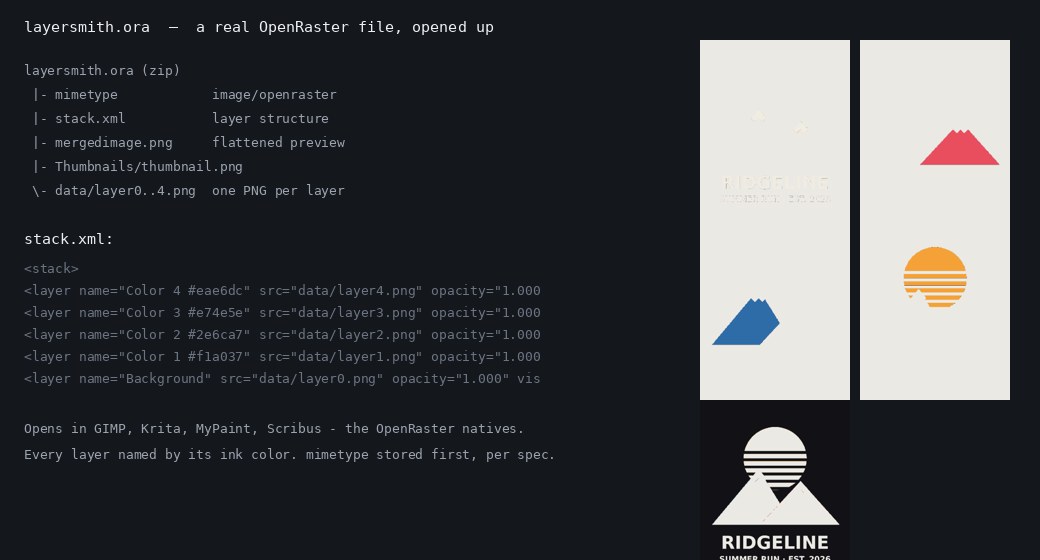
Free and unlimited, deliberately
ORA export has no daily cap and never will: the open-source crowd gets the open format for free. The editor and the click-to-select AI also run entirely in your browser, so your image never uploads. If you also need a PSD for a client, that is there too (3 a day free, unlimited once you buy credits).
Why ORA instead of PSD in open tools
GIMP and Krita read PSD through reverse-engineered importers that fight undocumented corners of the format; ORA is their home format — layers, names, opacity, and visibility land exactly as written. If your pipeline ends in an open tool, importing ORA simply removes a failure mode.
Frequently asked
Which programs open the .ora file?
Krita, GIMP, MyPaint, and Scribus all open OpenRaster natively. Krita and GIMP are the most common destinations and both preserve the layer names and order.
Is the export really unlimited and free?
ORA and PNG-stack exports have no cap and no watermark, at any tier. Downloads do need a free account — Google, Apple or an emailed code, no card — and the daily cap applies only to the layered PSD, which is one a day free and 3 credits after that.
Are the layers lossless?
Yes: each layer is stored as a full-resolution PNG inside the archive, exactly as it appears in the editor.
Can I convert PSD to ORA here?
This tool creates layers from flat images. If you already have a layered PSD, GIMP and Krita can open it directly and save as ORA — you do not need us for that.
Keep reading
Split any image into editable layersNeed a PSD as well? Image to PSD layersHow PSD layer writing actually worksRelated
A layered PSD that keeps your full resolutionRebuild flat artwork into a print-ready layered PSDAn Image to Layers alternative, compared honestlyUpscale artwork for printing without it going softA free image upscaler that does not ask for anything firstHow to get an image to 300 dpi for printingSeparate an image into layers online, free*How to edit text in a flattened image in Photoshop