dpi → pixels, properly
How to get an image to 300 dpi for printing
* Free to use — the editor runs in your browser, and nothing is uploaded unless you start a server step: the AI tools, or upscaling a photograph (logos and flat artwork are enlarged on your device). A free account (Google, Apple or an emailed code — no card) is needed to download the finished file, and comes with credits for the server-side tools.
Changing a file from 72 dpi to 300 dpi in an export dialog does nothing at all to the picture. Dots per inch is not stored detail — it is an instruction about how large to print the pixels you already have. If the pixels are not there, the only options are a bigger original or a genuine reconstruction.
Check your artworkThe arithmetic, once
Pixels needed equals print inches times dpi. A 4-inch chest logo at 300 dpi wants 1,200 pixels across. An 11-inch front print wants 3,300. A 12-inch square wants 3,600 each way, which is about 13 megapixels. Measure your file against that number and you have your answer — everything else is a distraction, including whatever dpi value the file claims.
Why the dpi field lies to you
Set a 900×900 JPG to 300 dpi and you have told the printer to lay it down three inches wide. Set the same file to 72 dpi and you have asked for twelve and a half inches of the same 900 pixels. Nothing about the image changed between those two; only the instruction did. This is the single most common reason a file that looked fine on screen prints soft.
When 300 is the wrong target anyway
It is a garment and signage rule of thumb, not a law. DTF and screen printing are comfortable at 300 at final size. A banner read from ten feet away is fine far below it, because the viewing distance does the work — large-format shops routinely output at 100 to 150. Chasing 300 on a six-foot banner produces an enormous file and no visible benefit.
What to do when you are short
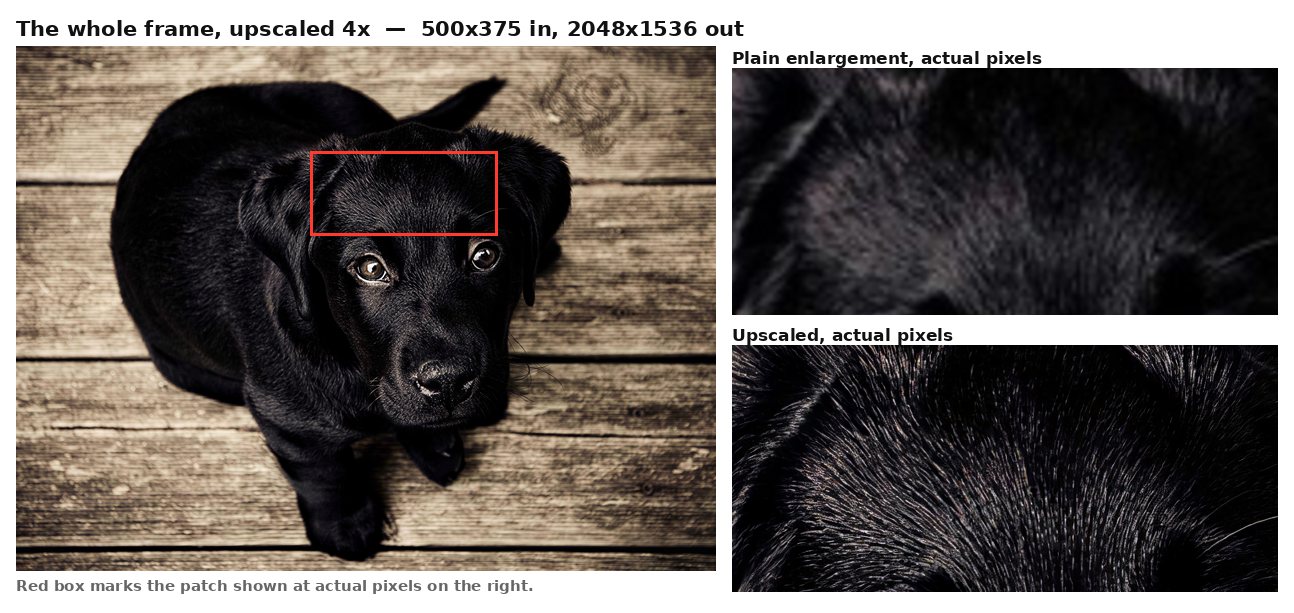
Ask for the original first — a vector logo or the designer’s source file beats any reconstruction, every time, and costs nothing but an email. When that is not available, an upscale reconstructs detail rather than interpolating between pixels, which is what makes a photograph come back usable rather than merely larger. Type is the exception — letterforms can come back sharp but subtly misshapen, so set those from the font rather than upscaling them. Free here at up to 4 megapixels signed out and 8 with a free account, no watermark. Past 8 megapixels — a full 12-inch square at 300 — you are into credits.
Frequently asked
Can I just change the dpi to 300?
You can, and it will change nothing about the image. Dpi tells the printer how big to lay the pixels down; it does not create any.
How many pixels do I need?
Print inches times dpi. Eleven inches at 300 dpi is 3,300 pixels across.
Is 300 dpi always right?
For garments and small format, yes as a rule of thumb. Large banners are viewed from far enough away that 100 to 150 is normal and 300 is waste.
What if my file is way too small?
An upscale rebuilds it up to 8 megapixels on a free account. Photographs recover very well; type is the hard case, because a letterform can come back sharp and subtly the wrong shape.
Keep reading
Upscale artwork for printingPrepare a DTF transfer fileSublimation artwork prepPrint-on-demand artwork prepRelated
Separate an image into layers online, free*How to edit text in a flattened image in PhotoshopPrepare artwork for DTF transfersSeparate a design into colour layers for vinyl cuttingPrepare a sublimation design with a transparent backgroundGet artwork print-on-demand readyTurn a screenshot into an editable, layered PSDPNG to PSD with real layers, not a renamed file